Playing freely
The zone screen, where the app holds the harmony and nothing you play can be wrong, and the chord panel that follows you round the app.
A screen with nothing to get wrong
Section titled “A screen with nothing to get wrong”On the zone screen there is no roll, no target and no score. Every key you play sounds, and the app holds a chord or a low note under you. The keys of the exercise are lit so you can see where you are, and the keyboard shows the same stretch of keys for the whole run. On iPhone the screen turns sideways, like the roll.
It appears as a step in a session when the plan has a free-playing exercise, and whenever you open Play freely.
Opening Play freely
Section titled “Opening Play freely”The Play freely card on the dashboard opens the zone screen with no plan and no clock. It needs your keyboard, so the card is dimmed while none is connected and no computer keyboard is attached. On a rest day the main button can read Play freely itself.
The app opens the free-playing exercise furthest along the ones you have unlocked, in the key you chose for today.
Starting and pausing
Section titled “Starting and pausing”Nothing moves until you tap in the ring. You hear and see one bar counted in, then the app starts playing.
While it runs, tap the ring to pause: the backing stops where it is. Tap to carry on after another count-in. In a session the ring fills as the time passes and the run ends when it is full. In Play freely the ring only breathes; you decide when to stop.
What the app is holding
Section titled “What the app is holding”A card names what the app plays: The app holds this: for a single low note, The app plays this: for chords. Then comes the chord as number and name, such as “1 · C”. A cyan ring round the number means it is sounding right now; it fades between chords and while paused.
Tap the key name with , such as “in C major”, to read what the numbers mean. The run pauses while you read.
Outline and fill
Section titled “Outline and fill”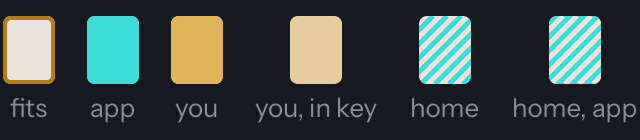
The keyboard uses two kinds of mark. A gold outline is a key on offer: a note of the chord playing right now, a good place to land. The outlines move with each chord change. A fill is a key sounding right now: cyan is the app; gold is you, full gold on a note of the chord and pale gold on another note of the key. A key you play outside the key turns a soft gray instead.
Keys of the zone show their number where there is room, white or black. The 1 is home: it is striped, white key or black, in every octave, and stays striped while it sounds. A legend names the marks.
The goal for the run
Section titled “The goal for the run”Each run has one goal, shown on the zone screen as one line: stay in the key; when the chord changes, land on an outlined key; end your phrases on home, the 1; or try notes you haven’t used yet. It stays the same until the run ends, and nothing on screen counts it.
The app picks the goal from how your earlier runs went, on your device, and gives the next run a different one. Over a single held note there is no chord change, so that goal is never picked for it.
When a key glows
Section titled “When a key glows”
When your first note after a chord change is one of the new chord’s notes, that key glows softly for a moment. The same happens when a phrase comes to rest on home: after the short silence that ends it, the 1 you ended on glows. There are no points and no counter; the glow is only a nod.
Keys outside the zone
Section titled “Keys outside the zone”A key outside the lit ones is never wrong. It sounds like any other, turns a soft gray for a moment, and the gray fades by itself. Nothing is marked against you and nothing stops.
The zone ladder
Section titled “The zone ladder”In a session the zone map also shows the notes of the zone as a row of numbered circles, each with its letter; home, the 1, is the striped circle. They follow the keyboard’s marks: a gold ring for a note of the chord playing now, filled gold (pale off the chord) while you play it, cyan while the app does.
The notes you just played stay faintly lit for a moment. On a wide screen a recent trail names them too.
Quiet mode
Section titled “Quiet mode”Tap Less on screen for a calmer view: the numbered circles, the goal line and the legend step away. On iPhone the keyboard then shows more of the piano; on iPad it stays as it is, and the large ring keeps the time. The chord card stays. Tap Show everything to switch back. Quiet mode changes only the picture, not what is played or recorded.
Ending the run
Section titled “Ending the run”In Play freely, tap when you want to stop; while the run is going or paused, that ends it and shows how it went. Tapped again, or before you start, leaves the screen.
In a session the run ends by itself when the ring is full. leaves the screen at any time there, and a run you leave that way, before it ends, is not recorded.
The Done card
Section titled “The Done card”When a run ends, a Done card shows the coach’s words about what you played. No score and no numbers. When there is enough to go on, one sentence says where you landed: how often your first note after a chord change was one of the new chord’s notes, or, over a single held note, how often your phrases came to rest on home, named like “1 · C”. While the coach’s reply is on its way, the card says Reviewing your playing….
Finish leaves the screen and Again starts another run with a count-in. Inside a routine, Next exercise comes first, then Again, and Finish leaves the whole routine.
Without a keyboard
Section titled “Without a keyboard”Everything on the zone screen comes from your keys. If no keyboard is connected and no computer keyboard is attached, a warning says so at once, because nothing you do on screen could make a sound.
Playing anywhere in the app
Section titled “Playing anywhere in the app”With a keyboard connected, or a computer keyboard attached, you can play on the dashboard and most other screens too: it sounds like a piano, and a panel rises with your keys lit and, while you hold a chord, its name, such as “F minor 7”. The keys outside the key you are in are grayed, on every screen the panel appears on.
The panel hides by itself a few seconds after you let go, or at once with . Nothing played there is recorded. Practice and ear training switch it off while they run.